- PRODUCT
Release of VariCAD 2026 2.0, a 3D CAD software.
エーディーディー
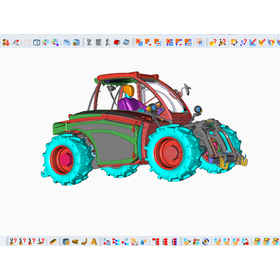
VariCAD, Inc. (https://www.varicad.com/) has released the Japanese version of VariCAD 2026 2.0 on February 20, 2026. VariCAD is a versatile CAD software that supports both 3D and 2D, making it an ideal choice for beginners seeking affordable yet high-functionality 3D CAD. The new version, VariCAD 2026 2.0, has improved the conversion/copying function for 3D solids, allowing for the copying of solids in a spiral shape. Additionally, the creation functions for basic solids and holes now allow for dimensional adjustments in 3D space during insertion. Furthermore, enhancements have been made to the functionality for 3D data imported from STL files, and new options have been added to the logical operation functions for solids. In 2D, new options have been added for creating drawing lines, and the ability to read 2D dimensions from DWG/DXF files has been strengthened.
- Date and time
- Capital
- Entry fee
Related Links
VariCAD 3DCAD | Visit the website of AD&D Corporation Download the trial version of VariCAD 3DCAD.Related product information
-
VariCAD - 3D CAD softwareLow-cost 3D CAD "VariCAD" that supports "monozukuri" (manufacturing).
VariCAD comes with a basic library of 3D solids (such as prisms, cylinders, cones, etc.) that can be easily modified through editing the original cross-section or parameters. Solids can also be easily created by rotating, extruding, or lofting cross-sections, and it is possible to blend between two cross-sections using tools, loft between circles and rectangles, or create helical surfaces. Commands can be assigned to any shortcut, allowing users to customize for ease of use. 3D models can be easily converted to 2D drawings, enabling the creation of standard mechanical drawing documents. By specifying views within the 3D space, it is possible to create 2D views of one or more selected solids. 【Supported File Formats】 <Output Formats> STEP format (3D), STL format (3D), IGES format (3D), DWG format (2D), DXF format (2D) <Input Formats> STEP format (3D), DWG format (2D), DXF format (2D) The free version can be downloaded from the following URL: https://varicad.add-soft.jp/download/
-
Easy integration with BOM 3DCAD VariCADStreamlining production management through the integration of VariCAD-BOM and 3D CAD.
VariCAD - 3D CAD Software - VariCAD allows for easy creation of 3D solids such as prisms, cylinders, and cones by simply inputting numbers, and editing parameters makes modifications easy. - Solids can be created through the rotation, extrusion, and lofting of profile sections, and tools are available to blend between two sections, loft between circles and rectangles, and create spiral surfaces. - Commands can be assigned to any shortcut, allowing for customization to make it user-friendly. - The view of a 3D model can be instantly converted into a 2D drawing, and cross-sections of solids can also be easily created.
-
3DCAD VariCAD makes it easy to create cross-sectional views and isometric views.3D CAD VariCAD for creating cross-sectional views and perspective views.
VariCAD - 3D CAD Software - VariCAD allows for easy creation of 3D solids such as prisms, cylinders, and cones by inputting numerical values, and editing parameters makes modifications simple. - Solids can be created through rotation, extrusion, and lofting of profile sections, and tools are available to blend between two sections, loft between circles and rectangles, and create helical surfaces. - Commands can be assigned to any shortcut, allowing for customization to enhance user-friendliness. - The view of a 3D model can be instantly converted into a 2D drawing, and cross-sections of solids can also be easily created. 【Supported File Formats】 <Output Formats> STEP format (3D), STL format (3D), IGES format (3D), DWG format (2D), DXF format (2D) <Input Formats> STEP format (3D), DWG format (2D), DXF format (2D) A free trial version can be downloaded from the following URL: https://varicad.add-soft.jp/download/
-
Easy integration of assembly drawings and parts files 3DCAD VariCADReduction of work time through the integration of assembly drawings and parts files 3D CAD VariCAD
VariCAD - 3D CAD Software - VariCAD allows for easy creation of 3D solids such as prisms, cylinders, and cones by inputting numerical values, and editing parameters makes modifications simple. - Solids can be created through rotation, extrusion, and lofting of profile sections, and tools are available to blend between two sections, loft between circles and rectangles, and create helical surfaces. - Commands can be assigned to any shortcut, allowing for customization to make it user-friendly. - The view of a 3D model can be instantly converted into a 2D drawing, and cross-sections of solids can also be easily created. 【Supported File Formats】 <Output Formats> STEP format (3D), STL format (3D), IGES format (3D), DWG format (2D), DXF format (2D) <Input Formats> STEP format (3D), DWG format (2D), DXF format (2D) The free version can be downloaded from the following URL: https://varicad.add-soft.jp/download/
-
Easy measurement of volume/mass with automatic calculation function 3DCAD VariCADEasily measure volume and mass with the automatic calculation feature of 3DCAD VariCAD.
VariCAD - 3D CAD Software - VariCAD allows for easy creation of 3D solids such as prisms, cylinders, and cones by inputting numerical values, and editing parameters makes modifications simple. - Solids can be created through rotation, extrusion, and lofting of profile sections, and tools can be used to blend between two sections, loft between circles and rectangles, and create helical surfaces. - Commands can be assigned to any shortcut, allowing for customization to make it user-friendly. - The view of a 3D model can be instantly converted into a 2D drawing, and cross-sections of solids can also be easily created. 【Supported File Formats】 <Output Formats> STEP format (3D), STL format (3D), IGES format (3D), DWG format (2D), DXF format (2D) <Input Formats> STEP format (3D), DWG format (2D), DXF format (2D) *Download the 30-day free trial version here https://varicad.add-soft.jp/download/
-
Significant reduction in work time with batch printing of drawings 3DCAD VariCADSignificant reduction in work time with batch printing of drawings!! 3D AD "VariCAD"
VariCAD - 3D CAD Software VariCAD allows for easy creation of 3D solids such as prisms, cylinders, and cones by simply inputting numbers, and editing parameters makes modifications easy. You can create solids through profile section rotation, extrusion, and lofting, and use tools to blend between two sections, loft between circles and rectangles, and create helical surfaces. Commands can be assigned to any shortcut, allowing for customization to make it user-friendly. You can instantly convert 3D model views into 2D drawings, and creating cross-sections of solids is also straightforward. 【Supported File Formats】 <Output Formats> STEP format (3D), STL format (3D), IGES format (3D), DWG format (2D), DXF format (2D) <Input Formats> STEP format (3D), DWG format (2D), DXF format (2D) A free trial version can be downloaded from the following URL: https://varicad.add-soft.jp/download/
-
Prevent design mistakes with interference checks!! 3DCAD "VariCAD"Prevent design mistakes with interference checks!! 3D CAD "VariCAD"
VariCAD - 3D CAD Software - VariCAD allows for easy creation of 3D solids such as prisms, cylinders, and cones by inputting numerical values, and editing parameters makes modifications simple. - Solids can be created through rotation, extrusion, and lofting of profile sections, and tools are available to blend between two sections, loft between circles and rectangles, and create spiral surfaces. - Commands can be assigned to any shortcut, allowing for customization to make it user-friendly. - The view of a 3D model can be instantly converted to a 2D drawing, and cross-sections of solids can also be easily created. 【Supported File Formats】 <Output Formats> STEP format (3D), STL format (3D), IGES format (3D), DWG format (2D), DXF format (2D) <Input Formats> STEP format (3D), DWG format (2D), DXF format (2D) A free trial version can be downloaded from the URL below: https://varicad.add-soft.jp/download/
-
Utilizing rendering features for presentations: 3D CAD "VariCAD"Utilizing CAD data in presentation materials with rendering features 3DCAD "VariCAD"
■Main Features of VariCAD 1. Low price starting from around 130,000 yen (including tax) - With one year of maintenance support and free upgrades included, starting from around 130,000 yen (including tax) - The renewal fee for annual maintenance support with free upgrades is also low! Running costs are kept low, allowing you to use the latest version at a low cost continuously. - Since it is a perpetual license, you can use it affordably without worrying about expiration like with subscription licenses. 2. Excellent operability and fast drawing capabilities - Intuitive operation with a user-friendly interface that is easy for CAD beginners to learn - Rich drawing assistance features such as snap and grid - Easily output 3D views to 2D drawings - Interference checks between models can be executed with just one button, and surface area and weight can be easily calculated automatically - Being a history-based 3D CAD software makes it easy to modify designs 3. High compatibility with other products - High compatibility with other CAD software, allowing input and output of 2D DWG/DXF files created in AutoCAD and 3D intermediate file formats like STEP files.
-
3D CAD VariCAD that can create data for 3D printers.VariCAD makes it easy to create data for 3D printers.
■Main Features of VariCAD 1. Low price starting from around 130,000 yen (including tax) - With one year of maintenance support and free upgrades included, starting from around 130,000 yen (including tax) - The renewal fee for annual maintenance support with free upgrades is also low! Running costs are kept low, allowing you to use the latest version at a low cost continuously. - Since it is a perpetual license, you can use it affordably without worrying about expiration dates like with subscription licenses. 2. Excellent operability and speedy drawing capabilities - Intuitive operation with a user-friendly interface that is easy for CAD beginners to learn - Rich drawing assistance features such as snap and grid - Easily output 3D views to 2D drawings - Interference checks between models can be executed with the push of a button, and surface area and weight can be automatically calculated easily - As a history-based 3D CAD software, it is easy to modify designs 3. High compatibility with other products - High compatibility with other CAD software, allowing input and output of 2D DWG/DXF files created in AutoCAD and 3D intermediate file formats like STEP files.
-
VariCAD allows for easy batch conversion to DXF/DWG/STEP.VariCAD allows for easy batch conversion to DXF, DWG, and STEP files.
■Main Features of VariCAD 1. Low price starting from around 130,000 yen (including tax) - Comes with one year of maintenance support and free upgrades starting from around 130,000 yen (including tax) - The renewal fee for annual maintenance support with free upgrades is also low!! This keeps running costs down, allowing you to use the latest version at a low cost continuously. - It is a perpetual license, so you can use it affordably without worrying about expiration dates like with subscription licenses. 2. Excellent operability and speedy drawing capabilities - Intuitive operation with a user-friendly interface that is easy for CAD beginners to learn - Rich drawing assistance features such as snap and grid - Easily output 3D views to 2D drawings - Interference checks between models can be executed with the push of a button, and surface area, weight, etc., can be easily calculated automatically - As a history-based 3D CAD software, it is easy to modify designs 3. High compatibility with other products - High compatibility with other CAD software, allowing import and export of 2D DWG/DXF files created in AutoCAD and 3D intermediate file formats like STEP files.
-
3DCAD VariCAD makes creating and editing assemblies easy.VariCAD makes creating and editing assemblies easy.
■Main Features of VariCAD 1. Low price starting from around 130,000 yen (including tax) - With one year of maintenance support and free upgrades, starting from around 130,000 yen (including tax) - The renewal fee for annual maintenance support with free upgrades is also low! Running costs are kept down, allowing you to use the latest version at a low cost continuously. - Since it is a perpetual license, you can use it affordably without worrying about expiration dates like with subscription licenses. 2. Excellent operability and speedy drawing capabilities - Intuitive operation with a user-friendly interface that is easy for CAD beginners to learn - Rich drawing assistance features such as snap and grid - Easily output 3D views to 2D drawings - Interference checks between models can be executed with a single button, and surface area and weight can be automatically calculated easily - As a history-based 3D CAD software, it is easy to modify designs 3. High compatibility with other products - High compatibility with other CAD software, allowing input and output of 2D DWG/DXF files created in AutoCAD and 3D intermediate file format STEP files.
-
Smooth data exchange with business partners 3DCAD VariCADVariCAD, with its rich features and easy operation, facilitates smooth exchanges of drawings with other departments and business partners.
■Main Features of VariCAD 1. Low price starting from around 130,000 yen (including tax) - Comes with one year of maintenance support and free upgrades starting from around 130,000 yen (including tax) - The renewal fee for annual maintenance support with free upgrades is also low!! This keeps running costs down, allowing you to use the latest version at a low cost continuously. - It is a perpetual license, so you can use it affordably without worrying about expiration like with subscription licenses. 2. Excellent operability and speedy drawing capabilities - Intuitive operation with a user-friendly interface that is easy for CAD beginners to learn - Rich drawing assistance features such as snap and grid - Easily output 3D views to 2D drawings - Interference checks between models can be executed with a single button, and surface area and weight can be automatically calculated easily - Being a history-based 3D CAD software makes it easy to modify designs 3. High compatibility with other products - High compatibility with other CAD software, allowing input and output of 2D DWG/DXF files created in AutoCAD and 3D intermediate file formats like STEP files.
-
Low implementation costs and operational costs for small and medium-sized enterprises with 3D CAD VariCAD.VariCAD, a 3D CAD software with low implementation costs and running costs for small and medium-sized enterprises.
■Main Features of VariCAD 1. Low price starting from around 130,000 yen (including tax) - With 1 year of maintenance support and free upgrades included, starting from around 130,000 yen (including tax) - The renewal fee for annual maintenance support with free upgrades is also low!! Running costs are kept down, allowing you to use the latest version at a low cost continuously. - Since it is a perpetual license, you can use it affordably without worrying about expiration dates like with subscription licenses. 2. Excellent operability and speedy drawing capabilities - Intuitive operation with a user interface that is easy for CAD beginners to learn - Rich drawing assistance features such as snap and grid - Easily output 3D views to 2D drawings - Interference checks between models can be executed with the push of a button, and surface area and weight can be easily calculated automatically - As a history-based 3D CAD software, it is easy to modify designs 3. High compatibility with other products - High compatibility with other CAD software, allowing input and output of 2D DWG/DXF files created in AutoCAD and 3D intermediate file formats like STEP files.
Related catalog