
New and Old Comparison Table Generation 'New and Old Document Excel Version' that Clearly Shows Comparison Results at a Glance








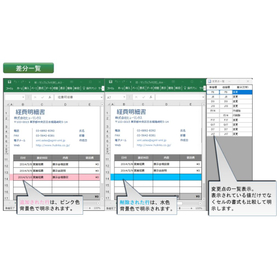
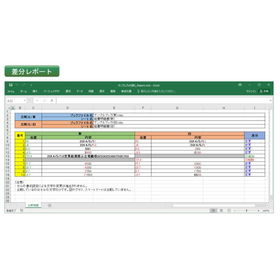
The comparison results of the Excel document are clear at a glance, making it easy to see differences and missed updates.
The New and Old Document Excel version operates as a plugin for Microsoft Excel. It offers the following features: ■ Compare two documents to quickly identify changes, even in large worksheets ■ Automatically generate accurate and easy-to-read "Difference Lists" and "Difference Reports" with simple operations ■ Jump to the cells with changes from the comparison display with one click ■ Compare not only text and values but also formulas and calculation results ■ Compare old versions of Excel and CSV files ■ Items that can be compared ・Changes in strings, numbers, and formulas within cells ・Addition of rows/columns ・Deletion of rows/columns ・Movement of rows/columns
basic information
【Functions and Features】 ■Display of Changes Displays the old and new Excel files side by side, clearly indicating additions, changes, and deletions with different text and background colors. ■List of Changes Provides a list of differences such as added rows and changes to text, values, and formulas. By clicking on the differences, you can focus on the changes and review the details. ■Report Output Allows you to output the differences and their details as a report in an Excel file. ■MS-Excel Add-in Functions as an Excel add-in, so all operations are completed within Excel. ■Utilization of Output The output file after extracting differences can be used for revision work. 【Comparable File Formats】 ・Excel Workbook (xlsx format) ・Excel 97-2003 Workbook (xls format) ・Text Files (CSV format, etc., text files that can be opened in Excel)
Price range
Delivery Time
Model number/Brand name
Old and New Documents - Excel Version
Applications/Examples of results
Development case of a Word add-in utilizing know-how from old and new documents. Visit the Hyulinks site: https://www.hulinks.co.jp/system-dev/dev_case1/
Detailed information
-

1. When installed, a "Compare Old and New Documents" tab will be added to Excel. 2. Clicking on "Select Documents" will open the file selection screen.
-
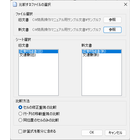
3. By selecting the file and sheet and pressing the OK button, the changes between the old and new documents are highlighted in color, and a list of changes is displayed simultaneously.
-
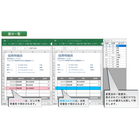
Jump to the changed cell with the push of a button.
-
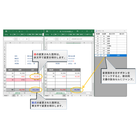
You can quickly check for changes without missing any, even on a large sheet.
-
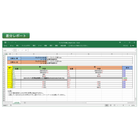
5. The report will be output in a new and old comparison table format. *Customization of the format is supported.
catalog(1)
Download All Catalogs
Recommended products



Distributors

Even in a rapidly changing world, the philosophy of HuLinks has not changed since its founding. The greatness of humanity lies in our ability to think, create, and carve out a new tomorrow. We aim to contribute to society by providing carefully selected solutions that support this remarkable human ability—intellectual creation—while also offering a more comfortable environment and enhancing productivity.