
Comparison of Curriculum Revisions for Educational Institutions: 'Old and New Documents Excel Version'









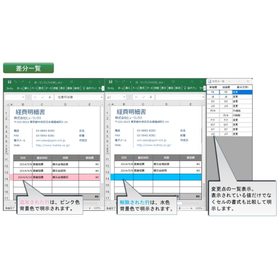
Support for the revision of educational institution curricula. Clearly understand the changes.
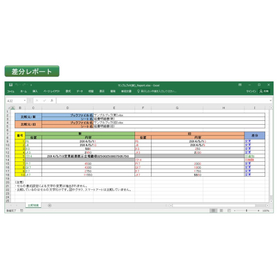
In curriculum revisions at educational institutions, it is essential to accurately compare past materials with the latest information to ensure that changes and updates are fully understood. Particularly in the review of curricula associated with revisions to learning guidelines or the introduction of new educational policies, overlooking minor changes can impact the quality of education. Our product, "New and Old Documents Excel Version," operates as a plugin for Microsoft Excel, allowing for the rapid identification of changes even in large worksheets by comparing two documents. It automatically generates accurate and easy-to-read "difference lists" and "difference reports" with simple operations, enabling users to jump to the cells with changes from the comparison display with one click, thus supporting efficient curriculum revision work. ## Use Cases * Comparing past materials with the latest materials during curriculum revisions * Confirming changes in educational content due to revisions of learning guidelines * Managing update histories of teaching materials * Comparing and discussing curriculum proposals among multiple teachers ## Benefits of Implementation * Prevention of overlooking changes in curriculum revisions * Reduction of work time and increased efficiency * Maintenance and improvement of consistency and quality in educational content * Facilitation of smooth information sharing among stakeholders
basic information
Load the old and new files to create a "Comparison Table." It will clearly indicate changes such as "modifications," "additions," and "deletions" to show the changes in documents (such as terms and conditions) submitted to government agencies and clients. Additionally, the modified sections will be highlighted in color for clarity. 【Features】 - Visually display changes by comparing two Excel documents (old and new) - Automatically generate "Difference List" and "Difference Report" to clearly present changes - Jump directly to the cells with changes with one click - Compare a wide range of changes, including text, numbers, formulas, and additions/deletions/movements of rows/columns - Operates as an Excel add-in, completing operations within Excel □ Function List □ (Go to the Hyulinks page) https://www.hulinks.co.jp/software/oan/#function □ Trial □ The demo version allows you to use the same features as the full version for 14 days. (Go to the Hyulinks page) https://www.hulinks.co.jp/software/oan_xls/#trial
Price information
(To the Hyulinks page)
Delivery Time
Model number/Brand name
Old and New Documents Excel Version
Applications/Examples of results
Please take a look at the catalog.
catalog(1)
Download All Catalogs
Recommended products






















Distributors

Even in a rapidly changing world, the philosophy of HuLinks has not changed since its founding. The greatness of humanity lies in our ability to think, create, and carve out a new tomorrow. We aim to contribute to society by providing carefully selected solutions that support this remarkable human ability—intellectual creation—while also offering a more comfortable environment and enhancing productivity.