Hacadly Automated 2D Drafting - 2D drawings generated automatically from 3D models

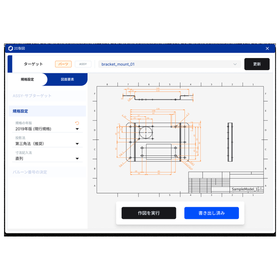
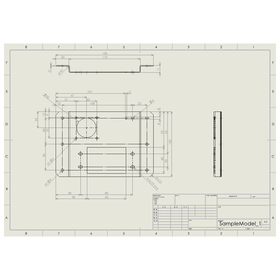
Generate views, dimensions, annotations and the title block automatically from a 3D model. Drawing release in minutes.
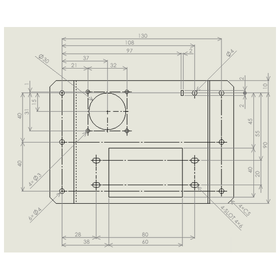
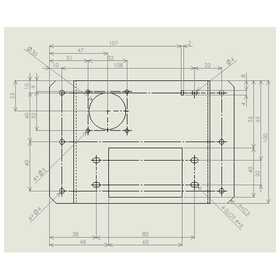
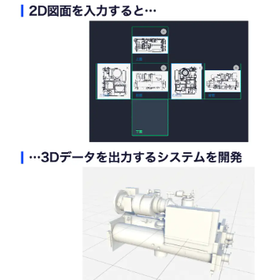
Hacadly Automated 2D Drafting generates 2D drawings complete with views, dimensions, tolerances, annotations and a title block - from a 3D model plus a few supplementary inputs. Dimensions are narrowed down to the set the drawing actually needs, and their placement is arranged automatically so that dimension lines do not overlap. Repeated features are grouped into a single callout such as "4 x Ø4", and detail views and the sheet size are chosen automatically to suit the part. You can choose where dimensions originate: from the outline (left and bottom edges), or from the centre of a hole you select. The same 3D model can therefore be drawn to match your own drafting standards. [Typical challenges] - Releasing 2D drawings after the 3D model is finished takes too long - Every design change means redoing the 2D drawings - Transcription errors in dimensions and annotations drive checking load and rework
basic information
- Supported CAD: iCAD SX, SOLIDWORKS (other CAD systems are being added - please ask) - OS: Windows - Delivery: CAD add-in / companion application - Target parts: Sheet metal (machined parts being added) - Generated content: Projected views (top / front / right side), detail views, dimensions and tolerances, annotations, title block - Model input: Directly from the CAD add-in, or by file upload - Standards: JIS edition year, projection method (third angle), dimensioning method - Drawing elements you specify: Front face, projected views, scale, sheet size, datums - Sheet frame: Sheet size chosen automatically from JIS standard frames to suit the part (or specified manually) - Dimension origin: Outline (left / bottom edge), or the centre of a selected hole - Annotations: Default notes applied automatically; one item per line to override (heading and numbering are automatic) - Output: Native drawings in the CAD you use / DXF, DWG - Security: Design data stays inside your own environment (on-premises)
Price range
Delivery Time
Model number/Brand name
Hacadly Automated 2D Drafting
Applications/Examples of results
[Applications] - Automating drawing release: view placement, dimensions, annotations and the title block are generated in one pass - Re-release after design changes: less manual rework of drawings once the model is revised - Standardising drafting: how views are taken, how dimensions are placed and annotation rules, applied as a company standard - Passing on expertise: keeping the way dimensions are followed as rules, so drawings vary less between engineers - Lighter checking of outsourced and offshore drafting: less effort spent finding missing dimensions and transcription errors [Examples of expected effect] - Electrical equipment manufacturer (300 drawings released per week): automating part drawing generation is modelled to compress a release operation spanning outsourced drafting and in-house checking - Mechanical design services firm (high-mix machinery design): drafting time per drawing cut from hours to tens of minutes * Figures are modelled together with the customer during evaluation. Actual results depend on the target parts and drafting standards. [For] Design engineers / drafting and drawing-release staff / managers of outsourced drafting / engineering managers
Detailed information
-

[STEP 1] Select the 3D model: just pick the target model in your CAD. Load it directly from the CAD add-in, or upload a file instead.
-
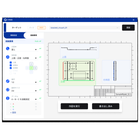
[STEP 2] Choose the datums and rules: specify the front face, projected views, scale, sheet size and datums. The JIS edition year and projection method can also be selected, so drawings come out in line with your own drafting standards.
-
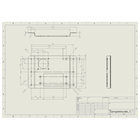
[STEP 3] Generate the drawing: views, detail views, dimensions, annotations and the title block are generated in one pass. The output is a native CAD drawing, so it can be edited and released as it is.
catalog(3)
Download All Catalogs

Recommended products
Distributors

WOGO Inc. automates design work in manufacturing using 3D geometry processing and AI. Under the "Hacadly" brand we provide automated inspection that detects machining limits and interference between parts directly from 3D CAD data, automated drafting that generates 2D drawings from 3D models, CAD design automation that turns design rules and know-how into programs, and design knowledge AI such as similar-drawing search and an AI platform for design information. We also work with customers on collaborative technology development: 3D data analysis and editing, 3D scanning, and building AI data platforms. By reducing the hours spent on inspection, drafting and design - and by capturing veteran engineers' judgement criteria as a company standard - we help our customers pass on their design expertise.